


QuickBooks Error Code 6000 83 is a problem related to company file accessibility. This error code displays a message when you try to access the company file data you need. To resolve this situation, it is recommended to perform a simple retry of the file opening process. However, if the error persists, it is important to contact our technical experts and provide them with the following error 6000 83 in QuickBooks.
Insufficient folder permissions are controlling access to your QuickBooks company file. For seamless operation in a multi-user environment, ensure that you have read/write access and file/folder creation/deletion privileges to the directory containing the company file.
Causes of Error Code 6000 83 in QuickBooks Desktop
QuickBooks Error 6000 83 usually occurs when there’s a problem opening, restoring, or backing up your company file. Below are the most common reasons for this error:
- Regional Settings Issue – If your Windows regional language is set to something other than English (U.S. or Canada), QuickBooks may run into errors.
- Wrong File Extension – The company file has an incorrect or unsupported extension.
- Incomplete QuickBooks Installation – If QuickBooks wasn’t installed properly, it can trigger this error.
- Limited User Permissions – Lack of access rights on the server, QBDataServiceUserXX, or Windows Admin can cause restrictions.
- Damaged Company File – A corrupted or damaged .qbw company file may lead to this issue.
- Corrupted File or Shared Folder – If the company file or the folder where it’s stored is damaged, the error may appear.
- Multiple Hosting Issues – The error often happens if more than one system is set to host the company file.
- Older File Conversion – Trying to convert a company file from an older QuickBooks version over the network can trigger this error.
- Incorrect File Format – The file might incorrectly appear as .qbm or .qbw.adr instead of .qbw.
- Improper Hosting Setup – Hosting should only be enabled on the server. If it’s turned on both the server and a workstation, the error can occur.
On the Linux servers:
- If no qbdir.dat file exists or if QuickBooks is not monitoring the company file in the qbmonitor directory.
- If the system is unable to ping the server name.
QuickBooks Company File Error 6000 83 – Common Scenarios and How to Fix Them
QuickBooks Error 6000 83 can appear in different situations, such as creating a backup, restoring a file, or working with a server-stored company file. Below are step-by-step solutions for each scenario. Try them one by one until the issue is resolved.
Scenario 1: Error Occurs While Creating a Backup
If the error shows up when making a backup of your company file, try changing the backup location:
- Go to the computer hosting your company file (server).
- Open QuickBooks and click File > Quit QuickBooks Desktop.
- Open This PC on your desktop and navigate to the C: drive.
- Right-click inside the drive, select New Folder, and name it QB Test.
- Open QuickBooks and create a backup of your company file.
- When prompted for a backup location, select the QB Test folder.
- Restore the backup to check if the error is resolved.
- If successful, you can use this backup as your primary file.
- Rename the older company file to prevent confusion or accidental overwriting.
Scenario 2: Error Appears While Restoring a Backup
This error often occurs when the backup file or folder has improper names:
- Click the Windows icon and open File Explorer.
- Navigate to the folder containing your QuickBooks backup file (.qbb).
- Right-click the backup file and select Rename.
- Remove any extra spaces, special characters, or symbols.
- Right-click the folder containing the file and rename it similarly.
- Close File Explorer and restart your computer.
- Open QuickBooks and restore the backup.
Scenario 3: Error Happens When the File is Stored on a Server
If the company file is on a Windows server, hosting settings may be causing the issue. Reset multi-user mode as follows:
- On a workstation, open QuickBooks and go to File > Utilities.
- If Host Multi-User Access appears, skip it.
- If Stop Hosting Multi-User Access appears, click it.
- On the server/host device, open QuickBooks and go to File > Utilities:
- Click Host Multi-User Access.
- Then select Stop Hosting Multi-User Access.
- Finally, click Host Multi-User Access again to reset the multi-user mode.
Scenario 4: Manually Fixing QuickBooks Error 6000 83 in Other Cases
If the error appears in situations not covered earlier, try the following manual solutions:
Solution 1: Use QuickBooks File Doctor
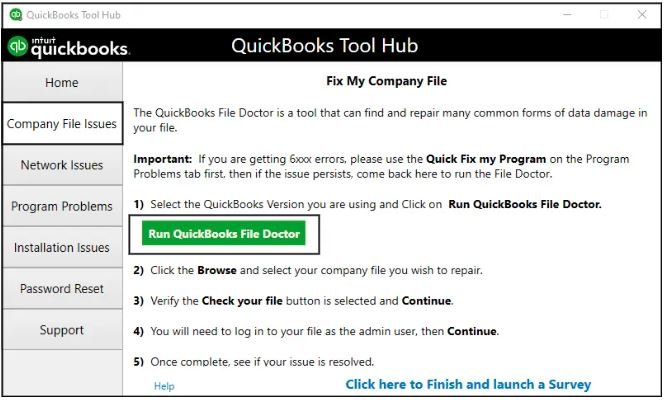
- QuickBooks File Doctor can automatically detect and fix company file or network issues.
- Download QuickBooks Tool Hub from the official Intuit website.
- Install and launch it, following the on-screen instructions.
- Go to the Company File Issues tab and run QuickBooks File Doctor.
- The tool will scan for errors and repair them automatically.
- Restart your computer to apply the changes.
Solution 2: Update QuickBooks
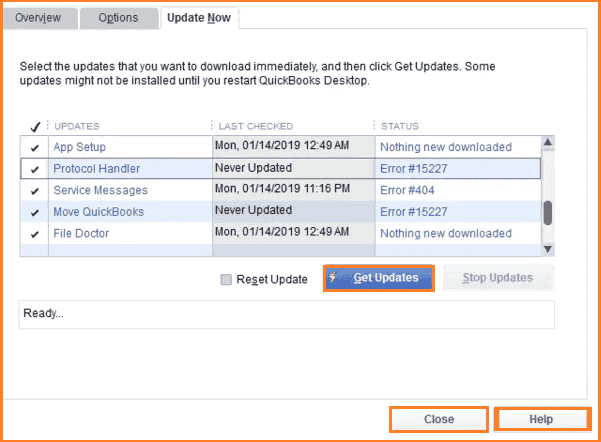
- Make sure you are using the latest version of QuickBooks Desktop.
- Updates often fix bugs and known errors, including 6000 83.
Solution 3: Check Firewall and Antivirus Settings
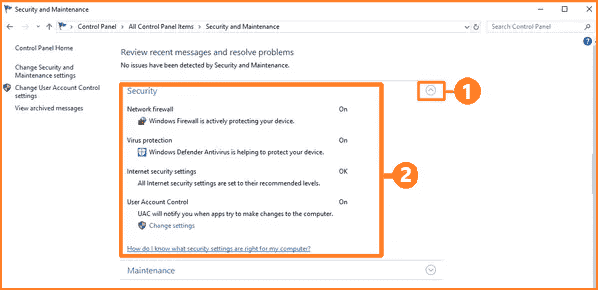
- Network or internet issues caused by firewalls may trigger the error.
- Review your firewall settings to ensure QuickBooks Desktop has access to the internet.
- Visit the firewall provider’s website for instructions on configuring exceptions.
- Allow QuickBooks files on all machines to communicate without restrictions.
Solution 4: Verify File Permissions
- Incorrect permissions can block access to company files.
- Navigate to the folder containing your QuickBooks files.
- Right-click and select Properties > Security.
- Ensure proper sharing and access permissions are assigned.
- Use Set Windows Permissions if necessary to allow seamless file sharing.
Solution 5: Scan QuickBooks Company Files
- Ensure the network data file (.ND) is created correctly.
- Open QuickBooks Database Server Manager:
- Start > Programs > QuickBooks > Database Server Manager.
- Click Add Folder and select all folders containing QuickBooks company files.
- Click Scan to scan all files.
- Confirm that each folder now has both .QBW and .ND files.
Solution 6: Repair QuickBooks Desktop Installation
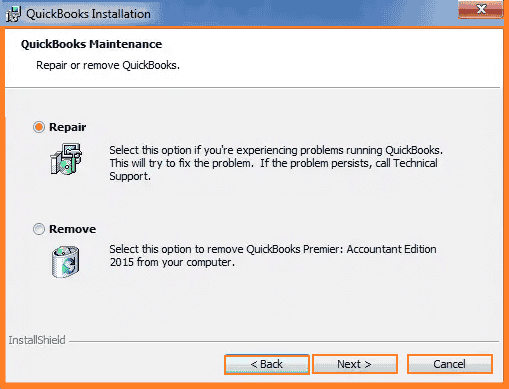
- If QuickBooks won’t open any files, the installation may be corrupted.
- Restart Windows and open Control Panel > Programs and Features > Uninstall a Program.
- Select QuickBooks Desktop and click Uninstall/Change.
- Choose Repair and follow the prompts: Continue > Next > Repair > Next > Finish.
- Restart your computer and try opening QuickBooks again.
Conclusion!
Intuit QuickBooks is nowadays hired by many businesses regardless of size and sector across the globe. Accounting software exists in abundance that helps manage and streamline the day-to-day troublesome business accounting and finance, all in one place. Productive features and strong customer support have no doubt made QuickBooks the most recommended business accounting software that holds the top position in the market. The software tracks daily business sales, expenses, reports, taxes, etc.
AccountsPro’s support team is very prompt and proactive and has not disappointed any customer yet. If you want to read more about QuickBooks errors, check out the full list here. Connect with us 24×7 through toll-free phone number ☎ +1800-983-3087.
Frequently Asked Questions
What is QuickBooks Error 6000 83?
QuickBooks Error 6000 83 occurs when users try to access, back up, or restore a company file. It usually indicates issues with the company file location, permissions, or damaged files.
Does error 6000 83 in QuickBooks occur only in multi-user mode?
No, while QuickBooks Error 6000 83 is common in multi-user environments, it may also occur in single-user mode if the file location or permissions are incorrect.
Can restoring a backup trigger QuickBooks Error 6000 83?
Yes, the error may appear if the backup file is stored in a compressed folder, on an external device, or if the file path contains special characters.
Do I need to be an admin to fix QuickBooks Error 6000 83?
Yes, Administrator rights are required to adjust permissions, change hosting settings, and run repair tools for QuickBooks.
How do I prevent QuickBooks Error 6000 83 in the future?
To avoid this error:
- Store QuickBooks files in a local or properly configured server folder
- Regularly back up company files
- Keep QuickBooks and Windows updated
- Ensure proper folder permissions for all users
What if QuickBooks Error 6000 83 persists after troubleshooting?
If the error continues, you may need to restore a recent backup, use advanced repair tools, or contact Accountspro QuickBooks support for in-depth assistance.
