


Companies rely on accounting software to maintain financial information that is true, tidy, and safe. In case you are still using the older version of QuickBooks desktop, you can no longer be updated with security and technical assistance. This is the reason why a lot of enterprises are currently deciding to upgrade older QuickBooks to 2024 to improve performance, security, and availability of the latest accounting applications.
The new QuickBooks Desktop comes with faster processing and reporting, and is more integrated with current systems. QuickBooks 2024 upgrade will enable companies to stay updated, safeguard their financial data, and enhance their workflow. In this guide, you will learn about the reasons why upgrading is necessary, how to plan for an upgrade, and the specific steps to upgrade QuickBooks Desktop safely.
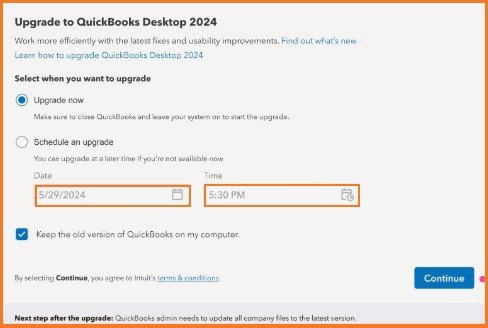
Table of Contents
- 1 QuickBooks Desktop 2024 Upgrade Reasons
- 2 Signs to Consider Upgrading QuickBooks
- 3 Things to Do Before Upgrading QuickBooks
- 4 Steps for Upgrading an Older Version to QuickBooks 2024
- 5 QuickBooks Desktop Update Guide
- 6 Common Issues during a QuickBooks Version Upgrade
- 7 Best Practices after Upgrading QuickBooks
- 8 Benefits of QuickBooks Desktop 2024 for Businesses
- 9 How Often Should You Upgrade QuickBooks?
- 10 Frequently Asked Questions
QuickBooks Desktop 2024 Upgrade Reasons
The implementation of old accounting software may cause various issues, such as security threats and incompatibility. When you opt to upgrade older QuickBooks to 2024, you will enjoy several advantages that not only help to increase your productivity but also make your financial results more accurate.
- Enhanced Security
Older QuickBooks versions may no longer have security patches available. The newest release includes enhanced security patches and encryption methods to safeguard sensitive financial data. - Faster Performance
The latest one increases the processing speed of reports, transactions, and loading files. The upgrade will be of particular benefit to businesses that operate with huge company files. - Improved Reporting Tools
QuickBooks Desktop 2024 has superior reporting capabilities that aid the business in tracking finances, analysing profits, and making sound financial decisions. - Better Compatibility
The old ones might fail with the new operating systems. Upgrading to a QuickBooks version will guarantee modernisation with the Windows systems and other applications. - Continued Technical Support
Intuit progressively ceases to support older versions of QuickBooks. By upgrading, you will not only receive product updates, payroll services, and technical support but also enjoy other benefits.
Signs to Consider Upgrading QuickBooks
Most of the businesses go on with the old versions until they start showing problems. These are just some of the obvious indications that it is time to upgrade older QuickBooks to 2024.
- QuickBooks is a slow and crash-prone program.
- Payroll services cease operation.
- Security warnings are displayed in updated messages.
- The reports are more time-consuming.
- Intuit no longer supports the software.
If you observe these problems, then it is possible to assume that upgrading to QuickBooks 2024 will help eliminate them and enhance the performance of the system.
Things to Do Before Upgrading QuickBooks
It is noteworthy that you should prepare your system and data before you update QuickBooks Desktop. These measures can be used to avoid loss of data and make an easy upgrade.
1. Check System Requirements
Ensure that your computer is in line with the minimum system requirements of QuickBooks Desktop 2024. This comes with adequate RAM, storage, and an operating system that is compatible.
2. Backup Your Company File
Making a backup will save your financial information during the process of upgrading.
Steps to back up your file:
- Open QuickBooks Desktop
- Go to File
- Select Back Up Company
- Click Create Local Backup
- Keep the backup in a safe place.
3. Install Windows Updates
Before the new version, be sure that your Windows operating system is up to date.
4. Verify Your Data
To test your firm file before the upgrade to the QuickBooks version, you need to run a data verification check to confirm that you do not have any errors in the firm file.
- Open QuickBooks
- Go to File
- Select Utilities
- Click Verify Data
- In case there are errors, use the Rebuild Data tool and then upgrade.
Steps for Upgrading an Older Version to QuickBooks 2024
Once the preparation processes are done, you may proceed to the upgrade process. These are the procedures to take to upgrade older versions of QuickBooks to 2024.
Step 1: Purchase QuickBooks Desktop 2024
The new edition can be bought on the official Intuit site or from a certified reseller. Choose a version from the options available that best suits your company’s requirements.
- QuickBooks Desktop Pro Plus
- QuickBooks Desktop Premier Plus.
- QuickBooks Desktop Enterprise.
Right after making your purchase, you will receive a download link along with license details.
Step 2: Download the Installation File
- Go to the official download QuickBooks page.
- Select QuickBooks Desktop 2024
- Identify a suitable model of the product.
- Install the installation file.
- Save the file in a convenient place on your computer.
Step 3: Install QuickBooks Desktop 2024
To upgrade the QuickBooks Desktop, you need to do the following:
- Locate the installation file you just downloaded.
- The file can be installed by clicking twice.
- Accept the license agreement.
- Type in product numbers and license numbers.
- Choose which type of installation you’d like to proceed with.
- Click Install
Depending on the performance of the system, the installation can consume several minutes.
Step 4: Open Your Company File
- After installation of QuickBooks 2024:
- Launch QuickBooks Desktop 2024
- Choose Open or Restore an Existing Company.
- Choose your company file.
- Once the file is opened, QuickBooks can prompt you to upgrade it.
Step 5: Convert the Company File
Earlier versions of QuickBooks applied various file structures. With the QuickBooks 2024 upgrade, your company file is going to be upgraded as well.
- When you are prompted, click on Update Now.
- Do not interrupt the process until the conversion is manifested.
- Keep the updated company file in a safe place.
- Immediately after that, the data will be accessible for use in QuickBooks Desktop 2024.
QuickBooks Desktop Update Guide
When updating QuickBooks Desktop, you should often update it after updating to make sure you have the newest repair and security patches. Steps to update:
- Open QuickBooks
- Go to Help
- Choose Update QuickBooks Desktop.
- Click Update Now
- Choose Get Updates
- After the update is complete, restart QuickBooks.
The frequent updates will make your accounting software stable and secure.
Common Issues during a QuickBooks Version Upgrade
When it comes to upgrading a version of QuickBooks, there are cases when the businesses involved get into trouble. These are some of the general problems and their solutions.
1. Installation Errors
They can arise when such a system has no permissions or necessary components.
Solution:
- Run the setup file with admin rights.
- Disable antivirus while installing.
2. Company File Won’t Open
Old files sometimes do not get converted properly.
Solution:
- Check and use the Rebuild options.
- Restore the backup file.
3. Slow Performance After Upgrade
Having files of large companies will lead to performance problems.
Solution:
- Upgrade QuickBooks to the new version.
- Data utilities are used in optimising the company file.
Best Practices after Upgrading QuickBooks
Once you upgrade older QuickBooks to 2024, these are the best practices that can be used to ensure performance and security.
- Schedule Regular Backups
Automatic backups will prevent loss of your financial data. - Keep Software Updated
It is also important to keep in mind that you need to regularly update QuickBooks Desktop to get the latest improvements. - Train Your Team
There can be new tools and features added to the interface. Train them on the simplest training so that they can use them effectively. - Monitor System Performance
When you observe slow performance, and then choose to optimise your company file or upgrade hardware.
Benefits of QuickBooks Desktop 2024 for Businesses
The QuickBooks 2024 upgrade offers several business-friendly features that make it advantageous to businesses of all sizes.
- Improved Workflow Automation
The new version is an automated accounting system that helps save time and eliminates the manual errors of several accounting tasks. - Improved Inventory Control
Companies with inventory control are in a position to trace the inventory and its expenses in a more effective way. - Advanced Reporting
Better reporting facilities enable firms to dig deeper into financial information. - Improved Data Protection
The most recent security patches are used to safeguard sensitive business information.
How Often Should You Upgrade QuickBooks?
The questions that many businesses ask themselves in relation to the QuickBooks version upgrade are: how often should they upgrade their version? The best option is to upgrade every few years so that you are up-to-date with security updates and features.
The older versions lose their support in due time, which implies:
- No technical assistance
- No payroll updates
- No security patches
It is good to keep up with the times and ensure that your accounting system is not shaken by the changes.
Conclusion
The decision to upgrade the old QuickBooks to 2024 is a significant move towards companies that wish to have secure and effective accounting systems. The newest one has more well-performing, high-security features, and even better reporting functions that enable businesses to manage their funds more efficiently. The upgrade to QuickBooks 2024 will also make sure that your software is compatible with current systems, as well as ensure that sensitive financial data is not accessed by unauthorised parties.
By updating QuickBooks Desktop as stated above, business organisations can transition to this update with ease and start enjoying the new features contained in QuickBooks Desktop 2024.
For More Information Click Here – Upgrade QuickBooks Desktop 2020 to 2024.
Frequently Asked Questions
Will I lose my company data in the course of the upgrade?
No. The upgrade process will convert your company file to the new format; however, it is still advisable to make a backup first.
Is it possible to upgrade directly, out of an older version of QuickBooks?
Yes. The majority of older ones can be upgraded directly, but certain very old versions might need intermediate upgrades.
How long will the upgrade take?
Depending on how well your system runs and the size of the files you have in the company, it may take approximately 20-60 minutes.
Should I uninstall the old version of QuickBooks?
Not necessarily. QuickBooks Desktop 2024 is compatible with older versions and can be installed, but many users remove the old version after updating.
What will happen in case of the upgrade failure?
In case of the failure of the upgrade, you should restore your backup file, run a data verification, and once more attempt the upgrade or use the QuickBooks support that may help.
