


Sage software systems save crucial business data, including accounting journals, financial statements, and inventory data. Data loss in such Sage environments can occur due to system shutdowns, corrupted files, unintentional deletions, and other causes. Such datasets are restored by the Sage 50 data recovery tool to ensure compliance, precision, and uninterrupted operations.
Our systematic and technical solutions help users recover lost data in Sage 50 efficiently and effectively. Furthermore, preventive methods are added to minimize recurring Sage data loss incidents.
Read on to learn about our advanced Sage 50 corrupted company file recovery services and enhance long-term business security.
Table of Contents
Why are Sage 50 Data Recovery Services crucial for businesses?
Corruption or damage to Sage 50 data can interrupt reporting, business operations, and regulatory compliance. Certified recovery services help recover corrupted company files and secure financial integrity. This helps to keep the business running seamlessly.
Here are the reasons why it is crucial to restore corrupted Sage 50 files:
- Minimal Downtime– Quick recovery reduces data loss and helps resume regular accounting operations promptly.
- Security Governance and Regulatory Compliance– Secure operations safeguard financial information while complying with regulatory standards.
- Workflow Continuity– Re-establishing access to payroll, reports, and invoices helps avoid process inefficiency.
- Budget-friendly– Outsourcing recovery minimizes operational expenses and ensures an effective solution.
- Flexible assistance– Solutions expand and customize as per the business requirements and growing accounting requirements.
How Sage 50 Data Recovery Services Restore Corrupted Company Files
Dedicated recovery solutions are created to recover and recreate Sage databases with limited operational impact. The following systematic methods guarantee secure and precise Sage 50 corrupted company file recovery.
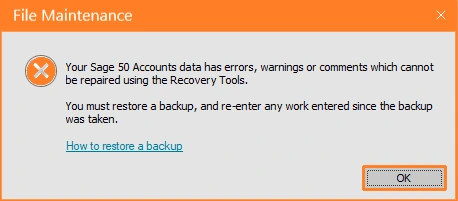
However, before implementing the Sage 50 Data Recovery Services, take into consideration the following:
- Before recovery, prepare a backup of the present data damage.
- Ensure that the backup has been created from the same old Sage 50 version or any previous version. This is because fresh backups do not support previous software versions.
Here are the steps for Sage 50 data recovery services to restore damaged company files:
- Take a backup of the corrupted Sage 50 file.
- Ensure to add service and contact information via a protected recovery channel.
- For assessment and resolution, upload the backup file.
- Professionals determine the corruption and conduct recovery procedures. The completion time relies on the file volume and technical complexity.
- After the recovery procedure is completed properly, users get a notification.
- Safely download the corrected file.
- Restore the file with the help of Sage 50 tools or include it in the correct directory.
What Our Data Recovery & Repair Services Offer?
Our comprehensive recovery solutions safeguard the Sage 50 data and ensure workflow continuity. Here is the list of our data recovery and repair services:
- Data Protection and Recovery
Safe, automated backups with prompt recovery to reduce downtime. - Data Repair Services
Latest tools and industry expertise to resolve damaged Sage 50 files. - Disaster Recovery Strategy
Modified recovery strategies for a quick and structured response when data loss occurs. - Secondary Data Storage
External and cloud backup solutions to secure against system failures or emergencies. - Cybersecurity Solutions
Protection against malware threats, ransomware incidents, and illegal access. - Data Loss Prevention
Tracking and managing to avoid sudden or unauthorized data loss. - Proactive Tracking and Assistance
Ongoing monitoring and prompt reaction to data concerns.
Why Hire Our Sage 50 Data Recovery Service Professionals?
Here is the list of the reasons to hire our qualified Sage 50 data recovery professionals:
- Industry expertise in the recovery of Sage 50 corrupted company files.
- Quick response time to restore corrupted Sage 50 files.
- For advanced data protection, file transfer is secured and encrypted.
- Proven success record in recovering corrupted company files.
- Clear and simple pricing model.
- Specialized professionals skilled in Sage 50 recovery services.
Conclusion
Data corruption or data damage can interrupt seamless business operations. Prevent business disruption with our skilled experts who analyse the issue, repair the corrupted file, and then restore it.
Make the most of our Sage 50 data recovery services with our skilled data agents. Call our Sage 50 data recovery agents and fix your data corruption issue forever.
Frequently Asked Questions
What are the indications of Sage data errors?
In Sage, delayed system performance often implies data issues. Other common symptoms include additional time for program loading, absurd characters in windows, unavailable transactions, etc. Locating these symptoms early helps restore corrupted Sage 50 files.
Why is Data Recovery in Sage so crucial?
Data recovery in Sage guarantees business consistency. Missing files interrupt financial management, late reporting, and might trigger financial loss. Restoring data enables seamless operations. Businesses accessing Sage 100, 50, 300, or Sage Business Cloud need customized recovery methods.
Does restoring corrupted data require a recent backup?
Yes. Recovery needs a proper backup to be taken before the corruption of data. Sage 50 recovers all company files, since the records are interconnected. Trying to recover with no backup gives rise to partial recovery risks, unpredictable records, and additional complications, etc.
Can data corruption be fixed by reinstalling Sage 50?
No. Reinstalling Sage 50 resolves the program files. It does not fix damaged company data. Data recovery emphasizes recovering company folders, records, and transactions. Just reinstalling cannot recover missing data or attain correct financial accuracy.
