


Sage 50 Fatal Error 1603 is a common installation error that occurs during installation, updating, or removal of Sage 50 software. Sage 50 Error 1603 is a common installation error. It is known as an InstallShield error and usually appears while installing the software. This error stops the setup process before it finishes, so the software does not install properly. Many businesses use Sage 50 to manage daily accounts and financial records, so this issue can delay work. The error usually happens because of a damaged .NET Framework, blocked permissions, antivirus interference, low disk space, or corrupted setup files.
To fix the InstallShield error 1603, check the main cause first. Repair the .NET Framework, run the installer as an administrator, free up disk space, or temporarily disable antivirus software during installation. Downloading a fresh setup file can also help. These simple steps usually allow Sage 50 to install without further problems.
This article mainly focuses on Sage 50. However, Error Code 1603 can also appear in Sage 100 and Sage 300. The table below explains the issue details, affected products, and the exact error message you may see during installation.
Table of Contents
- 1 Understanding Error Code 1603 in Sage 50, Sage 100, and Sage 300
- 2 How to Fix Sage 50 Error 1603
- 2.1 Solution 1: Disable User Account Control (UAC)
- 2.2 Solution 2: Delete Temporary Files
- 2.3 Solution 3: Use the Microsoft Easy Fix Utility
- 2.4 Solution 4: Delete Installer Registry Keys
- 2.5 Solution 5: Repair or Reinstall Windows Installer
- 2.6 Solution 6: Use a Third-Party Utility to Remove Stuck Entries
- 3 What are the main reasons for the Occurrence of Sage InstallShield error 1603
- 4 Frequently Asked Questions
- 4.1 What is Sage 50 Error 1603?
- 4.2 Can a damaged .NET Framework cause Error 1603?
- 4.3 Should I disable antivirus when installing Sage 50?
- 4.4 Does a missing .NET Framework cause Sage 50 Error 1603?
- 4.5 Can antivirus or firewall software trigger Error 1603?
- 4.6 Does running the installer as an administrator help?
- 4.7 Does insufficient disk space trigger Error 1603?
Understanding Error Code 1603 in Sage 50, Sage 100, and Sage 300
Error Code 1603 is a common Windows Installer issue that stops Sage software from installing or uninstalling successfully. It usually appears when system settings, services, or required components block the setup process.
| Issue Name: | Sage 50 Installation Error 1603 |
| Description: | During the installation of Sage accounting software, including Sage 50, Sage 100, Sage 300, Sage ACT, Sage Taxation, and Sage Contractor Edition, Error 1603 may occur due to several system issues. These issues include an outdated or disabled .NET Framework, multiple MSI processes running at the same time, a Windows Installer service that is turned off or not working correctly, disabled RDS compatibility, or a User Account Control (UAC) setting that blocks the installation process. |
| Error Message: | Error: “1603, A fatal error occurred during installation.” This error occurs during the installation or uninstallation process. |
| Applicable for Product: | Sage 50, Sage 50 Accounts, Sage Line 50, Sage 50 Premium, Sage 50 Canada, Peachtree, Sage 100, Sage 300, Sage ACT, Sage Taxation, Sage, and Sage Contractor 100 |
| Reports: | Not Applicable |
How to Fix Sage 50 Error 1603
Sage 50 Error 1603 occurs during installation due to permission issues, corrupted files, or Windows conflicts. You can resolve it by running the installer as an administrator, updating Windows, temporarily disabling antivirus software, repairing the .NET Framework, and reinstalling the Windows Installer service.
Solution 1: Disable User Account Control (UAC)
This solution temporarily turns off User Account Control to prevent Windows from blocking the Sage installation process.
- Open the Start menu and type UAC in the search bar.
- Click Change User Account Control settings.
- Move the slider to Never Notify and click OK.
- Click Yes to confirm the changes.
- Restart your computer.
- Re-enable UAC after completing the installation.
Solution 2: Delete Temporary Files
Clearing temporary system files helps remove unwanted data that may interfere with or stop the Sage installation process.
- Open File Explorer.
- Go to C:\Windows\Temp.
- Press CTRL+A to select all files.
- Press Delete and confirm the action.
- Click Skip for any files that are in use.
- Close File Explorer.
- Press Windows + R, type %temp%, and press Enter.
- Press CTRL+A to select all files.
- Press Delete and confirm the action.
- Click Skip for any files that are in use.
- Try installing the software again.
Solution 3: Use the Microsoft Easy Fix Utility
This method uses Microsoft’s repair tool to automatically find and fix Windows installation problems that may be causing Error 1603.
- Download and run the Microsoft Easy Fix Utility.
- Follow the on-screen instructions to detect and fix installation issues.
- Restart your computer.
- Try installing the software again.
Solution 4: Delete Installer Registry Keys
Removing old or corrupted Sage installer registry entries helps clear blocked installation records that may trigger Error 1603.
- Press Windows + R to open the Run dialog.
- Type regedit and click OK.
- Note: Back up the registry before making any changes.
- In the Registry Editor, go to the appropriate path based on your Windows version:
- 32-bit Windows: HKEY_LOCAL_MACHINE\SOFTWARE\Microsoft\Windows\CurrentVersion\Uninstall
- 64-bit Windows: HKEY_LOCAL_MACHINE\SOFTWARE\Wow6432Node\Microsoft\Windows\CurrentVersion\Uninstall
- Right-click Uninstall, then click Find.
- Type Sage 50 Accounting and click Find Next.
- Press F3 to search for the next entry. When you find a key with a Display Name matching your Sage 50 version, right-click it and select Delete.
- Navigate to:
- HKEY_CLASSES_ROOT\Installer
- Right-click the Installer, then click Find.
- Type Sage 50 Accounting and click Find Next.
- Press F3 to search. When you find a key with a Display Name matching your Sage 50 version, right-click it and select Delete.
- Close the Registry Editor and check whether you can install Sage 50.
Solution 5: Repair or Reinstall Windows Installer
Fixing or reinstalling the Windows Installer service helps resolve system-level installation errors that may cause Error 1603.
- Press Windows + R to open the Run dialog.
- Type msiexec.exe /? and press Enter.
- Find the Windows Installer version number and note it down.
- Repair or reinstall the Windows Installer as required.
Solution 6: Use a Third-Party Utility to Remove Stuck Entries
Using a third-party uninstaller helps remove leftover or stuck Sage installation entries that may block a fresh setup.
- Download a third-party uninstaller tool that can remove entries from the installed programs database.
- Open the tool and scan for installed programs.
- Find Sage 50 U.S. Edition or any previous versions.
- Select the entry and choose Remove or Uninstall to delete it.
- Restart your computer and try installing Sage 50 again.
What are the main reasons for the Occurrence of Sage InstallShield error 1603
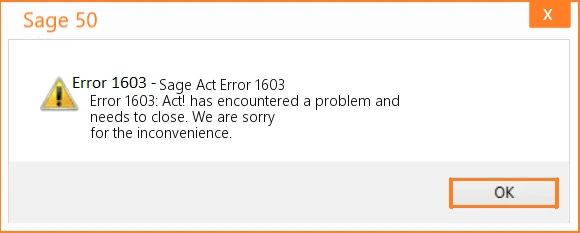
Sage Error 1603 usually occurs due to Windows-related issues that block the installation:
- Insufficient Permissions – The user does not have the necessary rights to install Sage software.
- Corrupt Installer Database – A failed previous installation has left damaged entries in the Windows Installer system.
- User Account Control (UAC) Restrictions – UAC settings may block the installation process.
- Overloaded Temp Folder – A large number of files in C:\Windows\Temp can interfere with the installation.
Users can contact the Sage 50 Technical Support team to check and verify the system settings needed to run Sage.
Conclusion
Sage 50 Error 1603 occurs during installation due to system conflicts, permission restrictions, or Windows component issues. Identifying the cause and following the correct troubleshooting steps can restore the installation and prevent interruptions. Keeping Windows updated and maintaining proper system settings can reduce the chances of this error in the future.
Need expert assistance to resolve Sage 50 Error 1603 quickly and safely? The professional support team at Accountspro.co is ready to help with reliable troubleshooting and accurate solutions. Contact experienced Sage specialists to restore Sage 50 and keep your business operations running smoothly.
Frequently Asked Questions
What is Sage 50 Error 1603?
Sage 50 Error 1603 is a common Windows Installer error that occurs during the installation or update of Sage software. This error indicates that the installation could not be completed successfully, usually due to system-level issues such as Windows permission problems, corrupted installation files, or conflicts with background processes.
Can a damaged .NET Framework cause Error 1603?
Yes. A missing or damaged Microsoft .NET Framework is a common cause of Sage Error 1603. Sage 50 relies on the .NET Framework for installation and operation, so the correct version must be installed and functioning properly.
Should I disable antivirus when installing Sage 50?
Yes. Temporarily disabling antivirus and firewall software can prevent interference during installation. These programs may block files or processes needed for Sage 50 setup. Remember to re-enable them after installation.
Does a missing .NET Framework cause Sage 50 Error 1603?
Yes. If the .NET Framework is missing, outdated, or corrupted, Sage 50 installation may fail with Error 1603.
Can antivirus or firewall software trigger Error 1603?
Yes. Security software can block installation files or background processes required by Sage 50. Disabling the antivirus and firewall temporarily can help resolve this issue.
Does running the installer as an administrator help?
Yes. Insufficient permissions can prevent Sage 50 from installing correctly. Running the setup file as an administrator allows the installer to make necessary system changes.
Does insufficient disk space trigger Error 1603?
Yes. Sage 50 requires sufficient free space on the system drive. If the primary drive lacks enough space, the installation may fail. Freeing up disk space before installation ensures the software and updates install correctly.
